How to Evaluate a Cloud Provider’s Security [Checklist]

![How to Evaluate a Cloud Provider’s Security [Checklist]](/v3/img/containers/blog_main/cloud_computing.jpg/5982b1adf933064618994915989c8491/cloud_computing.jpg?id=1739046670)


Cyberattack volumes remain high. In Q1 2025, organisations faced around 1,925 cyberattacks weekly. Ransomware attacks also rose during this period. The global average breach cost is now $4.44 million, down from $4.88 million in 2024, but still a significant amount. However, most cloud incidents still trace to customer-side errors. Hence, it is essential to pick a capable provider and configure it well.
This guide explains shared responsibility and gives you practical checklists on compliance, physical security, network defense, data protection, identity and access, incident response, and disaster recovery. Each section includes questions you can lift into requests for proposal (RFPs) and security questionnaires.
#Understanding the shared responsibility model
Cloud security is a partnership. The provider secures the cloud platform; you secure what you build and run on it. The split is commonly framed as “security of the cloud” versus “security in the cloud”.
#Provider covers
-
Physical data centers and access controls
-
Core network hardware and perimeter defenses
-
Hypervisors and virtualization layers
-
Storage and compute hardware
-
Service availability and uptime
-
Baseline compliance attestations
#You cover
-
Data classification and protection
-
Identity and access management
-
OS patching and hardening
-
Application security and code quality
-
Network rules, security groups, and routing
-
User accounts, keys, and secret rotation
#How it shifts by service model
-
IaaS (Infrastructure as a Service): you manage OS, networks, apps, and data.
-
PaaS (Platform as a Service): the platform handles OS and runtimes; you secure apps and data.
-
SaaS (Software as a Service): the application layer is managed for you; you manage users, roles, and your data inside it.
No matter the model, you own your data and identities.
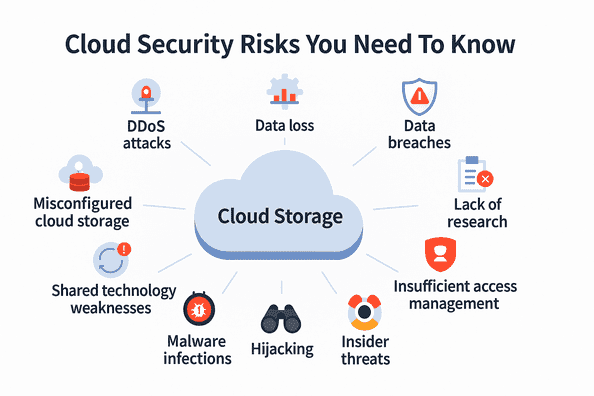
#Cloud provider security evaluation checklist
#1. Compliance certifications and standards
Certifications show that controls exist and are audited. Ask for scope, dates, and exceptions, not just badges.
What good looks like:
☐ SOC 2 Type 2 attestation in scope for the services and regions you will use.
☐ ISO/IEC 27001:2022 certification for the provider’s Information Security Management System (ISMS).
☐ PCI DSS compliance if you handle payment data.
☐ HIPAA alignment for US healthcare workloads. Start with the HHS Security Rule summary.
☐ GDPR obligations understood, especially Article 32 security of processing and storage limitation.
☐ FedRAMP for US federal work.
Questions to ask:
-
Which certifications cover the exact services and regions we plan to use?
-
When were the most recent reports issued, and when do they expire?
-
Can we review full reports or bridge letters for gaps?
-
What exceptions were noted, and what is the remediation plan?
-
How will you notify us about certification changes?
#2. Data center physical security
Facility design and operations matter. The Uptime Institute’s tiers are a useful benchmark. Tier I targets about 99.671 percent annual availability; Tier IV targets about 99.995 percent. Ask for the tier or design target and how it is validated.
What good looks like:
☐ Layered perimeter controls with CCTV coverage and patrols
☐ Strong entry controls: badges, biometrics, and mantraps
☐ 24x7 monitored surveillance and retained logs
☐ N+1 or 2N power, tested generators, fire suppression suited to data halls
☐ Documented media sanitization aligned to NIST's guidelines for media sanitization
☐ Visitor procedures with escorts, expiring badges, and auditable logs
Questions to ask:
-
What tier or design target applies to the specific site we will use?
-
How often do you test physical controls and review surveillance logs?
-
What is the exact process for failed drive destruction?
-
How long are facility access logs retained, and who can review them?
-
Can you share a redacted site security overview?
#3. Network security architecture
Attacks often begin on the wire. You want isolation, visibility, and active defenses.
What good looks like:
☐ DDoS protection is included by default, with clear options to upgrade.
☐ Segmentation and private connectivity to keep sensitive traffic off the public internet
☐ Firewalls and WAF with application-aware rules.
☐ IDS/IPS with automated containment and alerting
☐ Centralized logs and telemetry with SIEM integration. CIS Control 8 recommends retaining audit logs at least 90 days.
☐ Zero Trust support aligned with the Zero Trust Architecture. According to a Gartner survey, adoption is growing, but maturity varies.
Questions to ask:
-
What DDoS protections are always on, and what require a paid tier?
-
How do we create private, isolated networks that never traverse the public internet?
-
What flow logs, packet captures, and metrics can we access, and for how long?
-
How are east-west controls enforced inside the cloud network?
-
Which monitoring data is exportable to our SIEM in real time?
#4. Data protection and encryption
Encryption should be simple to enable and tough to accidentally disable. Control over the keys is absolutely critical.
What good looks like:
☐ TLS 1.2 or 1.3 everywhere. Configure it per NIST SP 800-52r2 and implement forward secrecy wherever you can
☐ Encryption at rest turned on by default, with support for customer managed keys and Hardware Security Modules (HSMs) when you need them
☐ Key management that handles rotation, revocation, and supports bring your own key scenarios
☐ Immutable or offline backups following the CISA StopRansomware guide
☐ Data residency controls so data stays where it needs to stay legally
☐ Lifecycle policies that actually align with GDPR principles (especially storage limitation)
Questions to ask:
-
Is at rest encryption actually enabled by default for the services we're planning to use?
-
Can we manage and rotate our own keys without needing provider intervention?
-
How do we verify where our data physically sits and gets replicated to?
-
What's the real restore time for point in time recovery? And how often do they actually test their disaster recovery (DR)?
-
How does permanent deletion work, including backups, logs, and all the other places data hides?
#5. Identity and access management
So many breaches start with identity gaps. You need to treat IAM as an ongoing program, not just a checkbox.
What good looks like:
☐ MFA for administrators and any high risk actions. Push for phishing resistant methods like FIDO2/WebAuthn
☐ Real least privilege implementation with granular roles and credentials that actually expire
☐ Service accounts with secure storage, automatic rotation schedules, and complete audit trails
☐ Federation/SSO using SAML 2.0 or OpenID Connect (OIDC) that integrates cleanly with your IdP (Identity Provider)
☐ Comprehensive audit logs covering sign ins, privilege changes, API calls, the works
According to Gartner's research, most cloud security failures are the customer's fault, usually misconfigurations and identity management issues.
Questions to ask:
-
Which actions specifically require MFA, and can we enforce the phishing resistant methods?
-
How granular can permissions actually get for specific resources and API endpoints?
-
How do temporary privilege elevations work?
-
What's the approval process and automatic expiration?
-
What logs can we export to our SIEM platform, and what's the retention period on those?
-
How fast can we kill compromised credentials and force key rotation everywhere they're used?
#6. Incident detection and response
You want a provider that detects quickly and contains even faster. Look for clear, time bound commitments and tested playbooks with actual roles, specific steps, and defined handoffs to minimize impact.
What good looks like:
☐ 24x7 monitoring with clear escalation paths and meaningful SLAs
☐ Real time detection and alerting that integrates properly with your SIEM
☐ Runbooks covering preparation, detection, containment, eradication, recovery, lessons learned, plus ISO 27035 alignment
☐ Forensics support including preserved logs and chain of custody documentation
☐ Customer notifications with actual promised timelines and regular status updates
Questions to ask:
-
What are your real detection and response times, based on actual recent incidents?
-
How and when exactly will you notify us about events affecting our data or services?
-
What logs and evidence are available to us during and after an incident?
-
Can you share any sanitized examples of past incidents and what changed as a result?
-
How do you meet regulatory breach notification timelines when they're applicable?
#7. Business continuity and disaster recovery
Plan for failure. It's not pessimistic, it's realistic. Make sure provider capabilities align with your actual recovery needs.
What good looks like:
☐ Published SLAs with proven architecture patterns to hit targets. Context: 99.9% availability equals about 8 hours 46 minutes downtime per year; 99.99% equals roughly 52 minutes
☐ Multi AZ and multi region options that support automatic failover
☐ Clear RTO/RPO choices with tested DR patterns: backup and restore, warm standby, active active configurations
☐ Immutable or offline backup capabilities
☐ Transparent, documented costs for backup, replication, and cross region egress
Questions to ask:
-
What RTO and RPO can you actually prove for our specific architecture?
-
How often is failover tested, and can we observe one of these tests?
-
What happens to our data during a regional outage?
-
What's your communication plan?
-
Are backup, replication, and egress costs documented clearly upfront?
-
Do you publish SLIs and SLOs?
-
How do these (SLIs and SLOs) relate to the contractual SLAs?
#8. Software supply chain and vulnerability management
Modern attacks increasingly target build pipelines and third party components. Ask providers to demonstrate how they build and patch safely, and how they'll help you prioritize actual risk over theoretical vulnerabilities.
What good looks like:
☐ Secure SDLC practices aligned with NIST's Secure Software Development Framework
☐ Software Bill of Materials (SBOM) availability for managed services plus timely vulnerability disclosures
☐ Patching timelines tied directly to CISA's Known Exploited Vulnerabilities (KEV) catalog
☐ Keys protected by actual HSMs, not just software
☐ Clear, actionable guidance for consuming KEV updates and prioritizing remediation efforts
Questions to ask:
-
Which specific secure development practices do your engineering teams follow? How is compliance verified?
-
Do you publish SBOMs for relevant services? Are they updated after significant releases?
-
How quickly do you fix KEV listed issues and notify affected customers?
-
Are customer KMS root keys stored in real HSMs? Can we see the certificate to prove it?
#Implement your evaluation in steps
-
Document obligations and data classes. Map regulations, sensitivity levels, retention limits, and residency needs. For GDPR, review Article 32 and the ICO’s storage limitation.
-
Build a weighted scorecard. Weight compliance, physical, network, encryption, IAM, and DR based on your risk profile.
-
Request evidence. Ask for SOC 2 and ISO 27001 reports, pen-test summaries, and architecture diagrams.
-
Meet the engineers. Request live demos of logging, key management, network rules, MFA enforcement, backup restores, and failover.
-
Run a proof of concept. Validate TLS and logging
-
Monitor continuously. Track certification renewals and security advisories. Build toward Zero Trust and watch adoption trends
#How Cherry Servers approaches cloud security
Cherry Servers provides bare metal dedicated servers where you control security entirely. No virtualization layer abstracts security management. You receive direct hardware access plus comprehensive infrastructure protection.
Infrastructure security features:
-
Secure data centers with 24/7 monitoring and biometric access controls
-
Environmental protections, including redundant power and cooling
-
Standard DDoS protection is built into the network infrastructure
-
Multiple European locations for geographic distribution
Data protection capabilities:
-
Complete control over encryption at rest and in transit
-
100GB network-attached backup storage
-
Backup storage operates separately from primary systems
-
Hardware isolation simplifies compliance requirements
Access and control:
-
Full server access through IP KVM consoles
-
SSH key authentication and custom configurations
-
No provider access to your data or applications after deployment
-
Root-level control over all security settings
Compliance and support:
-
EU-compliant infrastructure across Lithuania, the Netherlands, Germany, and Sweden
-
GDPR-aligned data residency for European requirements
-
Hardware isolation simplifying PCI DSS and HIPAA compliance
-
24/7 technical support for infrastructure issues
Transparency commitments:
-
Public documentation of hardware specifications
-
Complete access to server metrics and network statistics
-
Infrastructure security logs are available to customers
-
No hidden components or undocumented access
Also read: How to Secure a Linux Server
#Conclusion
Cloud security is a serious practice, not just a checkbox. Use this checklist to guide your buying choices, architecture, and everyday operations. Run proofs of concept. Set up automated guardrails for identity, encryption, logging, and recovery. Check metrics regularly and strive for constant improvement. Use this checklist with the hardware you manage.
Explore Cherry Servers’ dedicated servers. You can also reach out to our team to create a secure bare-metal setup for your needs.


