Excellent 4.4 out of 5 star rating on Trustpilot Trustpilot

AMD EPYC VDS Servers

Virtual dedicated servers built on AMD EPYC processors. Each EPYC VDS server runs on dedicated vCores and DDR5 memory, with NVMe storage in RAID 10 and a 1 Gbps uplink, in six locations across Europe, the USA, and Asia.

Available Locations:
NL
US
SG
SE
DE
CPU
4 to 16 vCores
RAM
16 to 64GB DDR4 RAM
Storage
100 to 400GB NVMe
Bandwidth
10 to 20TB / month

Our EPYC VDS Features

AMD EPYC Processor

Every plan runs on AMD EPYC processors, with DDR5 memory across 12 channels.

Deploy in 3 Minutes

Deploy pre-built EPYC VDS servers automatically from the Client Portal, the `cherryctl` command-line, or the REST API.

Crypto Payments

Cherry Servers accepts 12+ cryptocurrencies, from Bitcoin and Ethereum to USDC and Solana.

Most Popular EPYC VDS Servers

Built for high-traffic web applications, Kubernetes clusters, production databases, and business systems.

Up to 29% OFF
PREMIUM VDS 2
NL
US
SG
SE
DE
CPU
4 vCores
on 2 physical cores
Benchmark 3200
RAM
16GB
Storage
100GB NVME
Bandwidth
1Gbps
10TB / mo free traffic
$0.138 / hr
from
$57.33 / mo
Up to 36% OFF
PREMIUM VDS 4
NL
US
SG
SE
DE
CPU
8 vCores
on 4 physical cores
Benchmark 6000
RAM
32GB
Storage
200GB NVME
Bandwidth
1Gbps
10TB / mo free traffic
$0.219 / hr
from
$80.73 / mo
Up to 27% OFF
PREMIUM VDS 8
NL
US
SG
SE
DE
CPU
16 vCores
on 8 physical cores
Benchmark 10600
RAM
64GB
Storage
400GB NVME
Bandwidth
1Gbps
20TB / mo free traffic
$0.298 / hr
from
$127.52 / mo

Every EPYC VDS Server Includes

1 Gbps Uplink

You get a 1 Gbps uplink on every tier, with unmetered inbound traffic.

Root and Console Access

Reach your server with full root access over SSH, or a VNC console in the portal.

DDoS Protection

Our network filters common attack traffic by default, at no extra cost.

Free Egress Traffic

Get up to 20 TB of outbound traffic each month.

Floating IP

Reassign your floating IPv4 address to another server in the same location, instantly.

NVMe Storage

Store your data on NVMe disks, with up to 100,000 IOPS.

24/7 Human Support

Support engineers reply in 45 seconds on live chat, and within 15 minutes on tickets.

API and CLI Access

Provision servers via our REST API or the `cherryctl` command-line.

How to Deploy an EPYC VDS Server

Log In to the Client Portal

Sign in with your Cherry Servers credentials, or set up an account.

Start a New Deployment

From the portal, click New instance.

Select Dedicated Resources

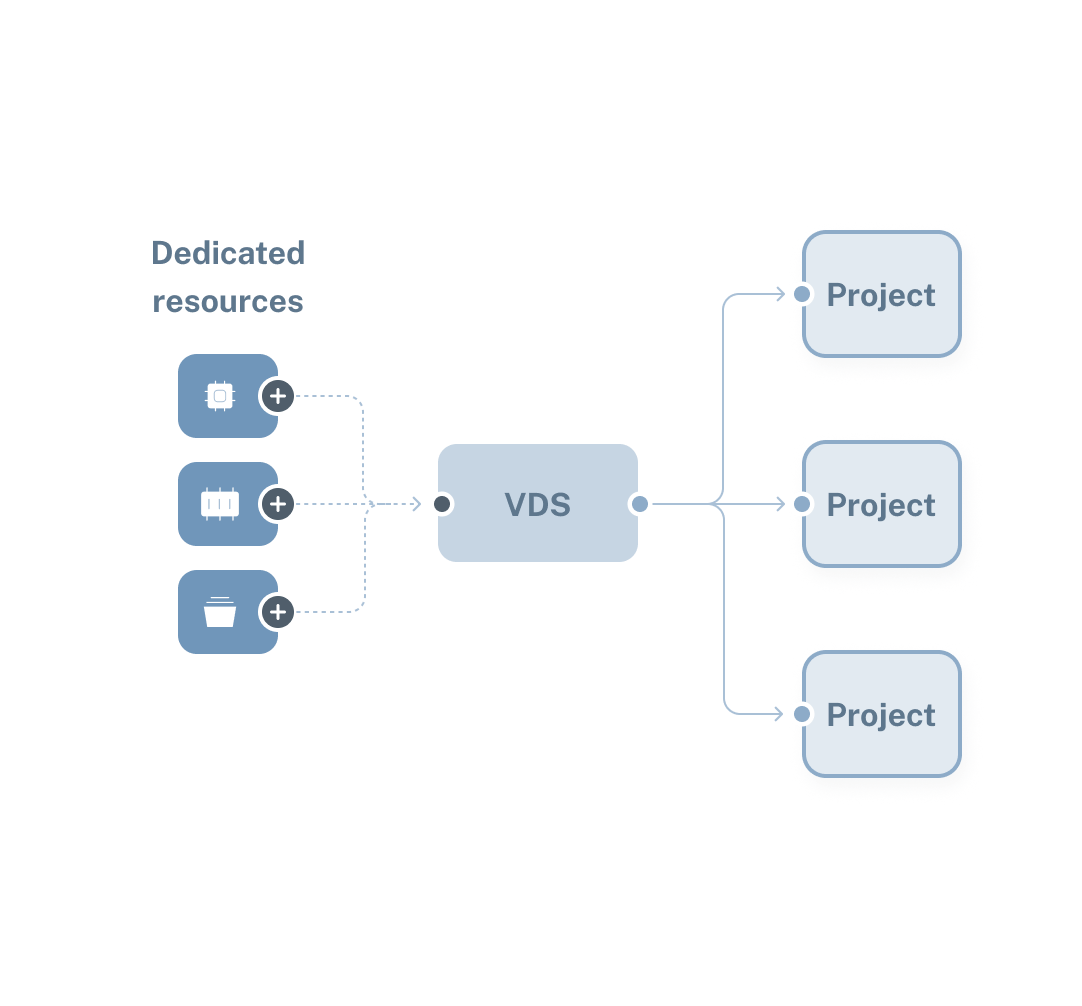
Under Virtual Servers, click Dedicated Resources, then the Premium VDS tab.

Pick Your EPYC VDS Server

Select an EPYC VDS plan with the vCores, RAM, and NVMe storage your application needs.

Select a Location

Choose the closest location to your users to keep latency low.

Choose an Operating System

Install Ubuntu, Debian, AlmaLinux, Rocky Linux, or any prebuilt operating system. You can use the entire disk or create a partition.

Configure Networking

Add floating IPs or a public subnet, and set the monthly egress limit to match your traffic.

Add a Hostname and SSH Key

You can enter a hostname, attach an SSH key, and add a cloud-config script.

Review and Deploy

Confirm your configuration, set hourly, monthly, or annual billing, and deploy the server.

Access Your Server

Connect through SSH or the VNC Console, then set up your applications.

AMD EPYC VDS Use Cases

High-Traffic Web Applications

EPYC VDS servers are built for high-traffic web applications, such as breaking news sites, social networks, and e-commerce platforms. Dedicated CPU and a 1 Gbps uplink keep applications responsive under load, and 10-20 TB of free egress traffic is included monthly.

Kubernetes Clusters

EPYC VDS servers are well-suited for small to medium Kubernetes deployments, such as staging environments, internal developer platforms, and production clusters of a few nodes. Dedicated vCores keep node capacity predictable, and a Kubernetes cloud controller manager synchronizes cluster and server state.

Business Systems

Business systems like CRM and ERP run at a steady load during business hours. An EPYC VDS backs these systems with a dedicated CPU and 16 to 64 GB of DDR5 memory, so response times do not drift.

Production Databases

Production databases processing heavy transaction volumes need flat query latency. Your database reads and writes on dedicated NVMe disks with up to 100,000 IOPS, and dedicated RAM ranges from 16 to 64 GB.

AMD EPYC VDS Benefits

Kernel-Level Control

Every EPYC VDS boots its own kernel. You can tune kernel parameters, raising connection limits for a busy web server or shared memory for a database. You can also load kernel modules, from the WireGuard VPN to the ZFS file system.

NVMe in RAID 10

Cherry Servers’ EPYC VDS storage runs on NVMe disks in a RAID 10 array. Each block is written to two drives, and the pairs are spread across the array, so a single drive can fail without costing you data.

Backups Held Off the Server

VM Backups copies your server every day and retains each copy for seven days, on a separate infrastructure node from your server. The daily copy runs inside a two-hour window you choose. You can trigger a manual copy once an hour and hold up to three manual copies at a time.

Private Networking by Default

Every EPYC VDS deploys with a private IP address and a private network interface already assigned. Your servers reach each other over it without any extra configuration from you. Servers on different network segments share one broadcast domain and behave as though they were cabled together.

Supported Payment Methods

Our client success stories

EPYC VDS FAQs

What is an EPYC VDS Server?

An EPYC VDS server is a virtual dedicated server (VDS) running on an AMD EPYC processor, with its CPU and memory allocated to one customer. It’s a kernel-based virtual machine (KVM), so it runs its own kernel and its own operating system.

What is the difference between a VDS and a VPS?

On a virtual private server (VPS), several accounts draw from a shared pool of CPU and memory, so your share can shrink when others’ load rises. A VDS reserves CPU and memory for a single customer, giving you a fixed amount that other accounts can’t draw from.

Is a vCore the same as a physical CPU core?

No. A vCore is one of two hardware threads on a physical core, so each plan lists twice as many vCores as cores. A 16-vCore plan runs on 8 physical cores, and a 4-vCore plan runs on 2. Both threads of each core are assigned to the same server, and no other customer’s workload runs on your cores.

Can I run Windows on an EPYC VDS?

No, EPYC VDS instances run Linux only. At deployment, you can choose from Ubuntu, Debian, AlmaLinux, Rocky Linux, or Fedora.

How quickly can I deploy an EPYC VDS?

Deployment takes an average of 3 minutes in every location. You can deploy from the Client Portal, the `cherryctl` command-line, or the REST API.

Looking for a different Cloud Infrastructure Solution?

Effortless cloud VPS deployment

Unlock the full potential of your business with flexible, reliable, and scalable Cloud VPS.

AI Servers: Custom dedicated GPU server for AI

Host resource-intensive ML and deep learning applications on powerful AI servers. Create your own AI server on a dedicated bare metal cloud equipped with powerful Nvidia GPU accelerators.

Why Developers Love Cherry Servers

Our customers consistently highlight speed, expertise, and personal attention from our team.

Start building today

Get up and running with your cloud project in a few minutes

Have questions about our server solutions or need assistance?

Fill out the form, and our team will get back to you!

No results found for ""
Recent Searches
Navigate
Go
ESC
Exit