FAQs
We've compiled the answers to some commonly asked questions about Cherry Servers products and services.
# General
# What is a Dedicated Server?
A Dedicated Server, also known as a Bare Metal server, is a private machine that allocates all of its hardware resources to a single user. In contrast to Virtual Servers, it doesn't have a virtualization layer, meaning that all of the server's hardware components are directly available to the user. Dedicated Server owners can even change its hardware components upon request.
# What is the difference between a Dedicated Server and a VPS?
A dedicated server is a physical server that offers a customer total access and autonomy over all the hardware resources, such as CPU, RAM, and disk space. It is a distinct physical hardware assigned to one customer only. Customers who choose this model do not share the physical server with other tenants.
A VPS (Virtual Private Server) is a partitioned slice of a physical server that runs on a virtualized layer known as a hypervisor. It runs separately from other virtual servers thanks to the isolation provided by the hypervisor. Unlike a dedicated server, VPS resources are limited since they share a slice of the underlying physical server's capacity.
# What support do I get?
Here at Cherry Servers you get 24/7 technical support with an average initial response time of 15 minutes free of charge. Every client gets a personal account manager that is deeply familiar with your needs. You may contact us by email, live chat or phone.
# How do I locate my server password after deployment?
When you order a server (Linux or Windows), the login information will be generated for you automatically. A Linux family operating system will always have the "root" default user, whereas a Microsoft Windows operating system will always have "Administrator" as the default user.
When the server is deployed to you, you'll receive an automated email without the generated password. To get it, log into your client portal and click on the new server:

The password will be visible in the overview section for 24 hours after deployment.

# How long does it take for a server to deploy after ordering?
All pre-configured servers are prepared and deployed automatically by our bare metal cloud platform. Bare metal server instances can be ordered manually through your client portal, or automatically through our REST API, Ansible module or your custom scripts.
This way, Linux based servers are provisioned within 15 to 30 minutes and Windows servers are provisioned in 30 minutes on average. Please note that additional 3rd party software, like Microsoft SQL, cPanel, DirectAdmin and some others, usually double the total time of server provisioning.
# What happens if my server is suspended?
Services ought to be paid until the end of active period (it is shown in your invoice).
You will receive an email notification (as well as an sms text message, if you have added your mobile phone no. in the CP) three times before the end of active period, starting one week until then.
As soon as the active period ends, in case the invoice is not covered yet - services get automatically suspended (you are not able to access your server(s) via OOBDM).
No later than in 6 days (for at least 6 months active services time) server's network is being turned off and it is scheduled for deletion.
If you are not able to pay the invoice on time, nor to up your credit balance, please contact our support immediately to keep your data safe.
# Billing
# How does the EU Travel Rule affect Me?
What Is the Travel Rule?
The new Travel Rule will directly impact cryptocurrency transactions. In case of higher risk cryptocurrency transactions, the recipient and the paying party will be obligated to exchange additional data*. For instance, if the transaction between "Coingate" and "Company" is settled, both sides will know who the sender and the recipient are.
*Customers' data will be stored in accordance with all GDPR regulations.
What Data Will Be Used in the Exchange?
For each transaction, the following information about both the sender and recipient might be required:
-
Sender's Information: full name, account address, and transaction details.
-
Recipient's Information: full name, account address, and additional transaction details.
What Transactions Will Be Affected by the New Regulations?
From January 1 st., 2025, this regulation will be valid for all higher risk transactions.
No action is needed if you're making a compliant transaction with a regulated party. For self-hosted wallet transactions, you'll need to provide proof of ownership for the external crypto wallet during the checkout.
What Additional Information will Be Requested?
Your payment experience will remain largely the same, with one adjustment: along with your email address, Coingate will now ask for some personal information, similar to standard payment methods.
- From individuals using cryptocurrency - Coingate will ask for the name, country of residence, and date of birth of individuals making cryptocurrency transactions.
- From businesses making B2B payments - Coingate will request the company name, incorporation country, and the name of the representative carrying out cryptocurrency transactions.
# What does the transition from USDT to USDC mean for me?
Why Is Cherry Servers Switching to USDC?
Due to new EU regulatory requirements under the MiCA (Markets in Crypto-Assets) framework, Cherry Servers will discontinue USDT payments via CoinGate starting March 23, 2025. Instead, we are transitioning to USDC, which is fully compliant and widely supported.
MiCA regulations require stablecoin issuers to meet specific compliance standards. At this time, Tether (USDT) and DAI have not met these requirements, which will lead to their discontinuation on CoinGate by March 23, 2025.
Key dates to keep in mind:
-
February 26, 2025 – USDT will no longer be available for purchases, conversions, or settlements on CoinGate.
-
March 23, 2025 – USDT payments, withdrawals, deposits, and conversions will be disabled. Any remaining USDT balances will be automatically converted to USDC at 1:1 rate.
How to Convert USDT to USDC
For EU clients holding USDT on a CoinGate-supported chain (excluding Tron):
If you are in the EU and hold USDT on a supported chain, you can convert it to USDC using a decentralized exchange like Uniswap, PancakeSwap, or SushiSwap.
Steps:
-
Connect a compatible crypto wallet (e.g., MetaMask, WalletConnect, Phantom).
-
Choose the USDT/USDC trading pair.
-
Enter the amount to swap and confirm the transaction.
-
Ensure you have enough native tokens for gas fees (ETH for Ethereum, BNB for BSC, etc.).
-
Once converted, you can proceed with the Cherry Servers payment.
For EU clients holding USDT on an unsupported chain (e.g., Tron):
Since USDC will no longer be available on the Tron chain, you must transfer your USDT to a supported network before converting to USDC.
Steps:
-
Use a blockchain bridge like Hyperlane, Layerswap, or Meson to move USDT from Tron to a CoinGate supported network (e.g., Ethereum, Polygon, Solana).
-
Connect a compatible wallet (e.g., MetaMask, TronLink, Phantom) to the bridge application.
-
Select the source (Tron) and destination (Ethereum, Polygon, etc.) network.
-
Execute the transaction and wait for confirmation.
-
Once USDT is on a supported network, use a decentralized exchange (Uniswap, PancakeSwap, etc.) to swap it for USDC.
-
Proceed with the Cherry Servers payment.
For non-EU clients holding USDT on any chain:
If you are a non-EU client, you can convert your USDT to USDC using a centralized exchange like Binance, Coinbase, or Kraken.
Steps:
-
Sign in or create an account on your preferred exchange.
-
Complete KYC verification if required.
-
Deposit USDT (ensure the correct network selection: Ethereum, Solana, Tron, etc.).
-
Trade USDT for USDC using the USDT/USDC trading pair.
-
Withdraw USDC to your wallet and proceed with the Cherry Servers payment.
Common Issues & Troubleshooting
Issue: Incorrect network selection
Solution: Ensure that you are depositing, withdrawing, or bridging on the correct network (e.g., Ethereum for USDC, Tron for USDT before bridging).
Issue: Insufficient gas fees
Solution: Make sure you have enough native tokens (ETH, BNB, MATIC, etc.) to cover transaction fees.
Issue: Incorrect wallet address
Solution: Always double-check the recipient address before sending funds to ensure they are sent to the correct stablecoin contract address.
# What is the Cherry Servers refund policy?
If the Customer has not breached any terms of the Agreement, such Customer is eligible to request Cherry Servers to issue a refund for an Order within first fifteen (15) days after such Order was placed.
Cherry Servers commits to refund such Order within seven (7) days for an amount received in Euros, less any amount for set-up fees, non-standard servers or server components provided under a special Customer request or third party licenses.
If the Customer operates in different currency than Euros, the refunded amount will be converted to different currency with regard to the currency exchange rate of the day when such refund is issued.
# What is 3D secure authentication?
3D Secure (3-domain structure) Authentication, also known as a payer authentication, is a security protocol that helps to prevent fraud for online credit card and debit card transactions. It allows banks to request extra details from a card holder to verity a purchase.
3D Secure is used extensively in the EU, Australia, India, Brazil, Mexico, Singapore, and other countries. It reduces the risk of fraudulent payments and makes online shopping and ecommerce much safer. For instance, 3D Secure Authentication is not prevalent in the US, where bank card fraud is about 4 times higher compared to the EU.
# What should I do when 3D authentication fails?
If you receive a "3D Authentication failed" error, it means that you have not entered the required information successfully. Please double check that Caps Lock is disabled and repeat the process making sure there are no typing errors.
If the error remains, please contact your credit card issuer for additional information.
# Do I still incur charges on inactive bare metal servers?
Yes, as the machines are still reserved for you. If you wish to cancel a machine and stop paying, you should terminate them in a client portal.
# Network
# Which type of IP range should I choose?
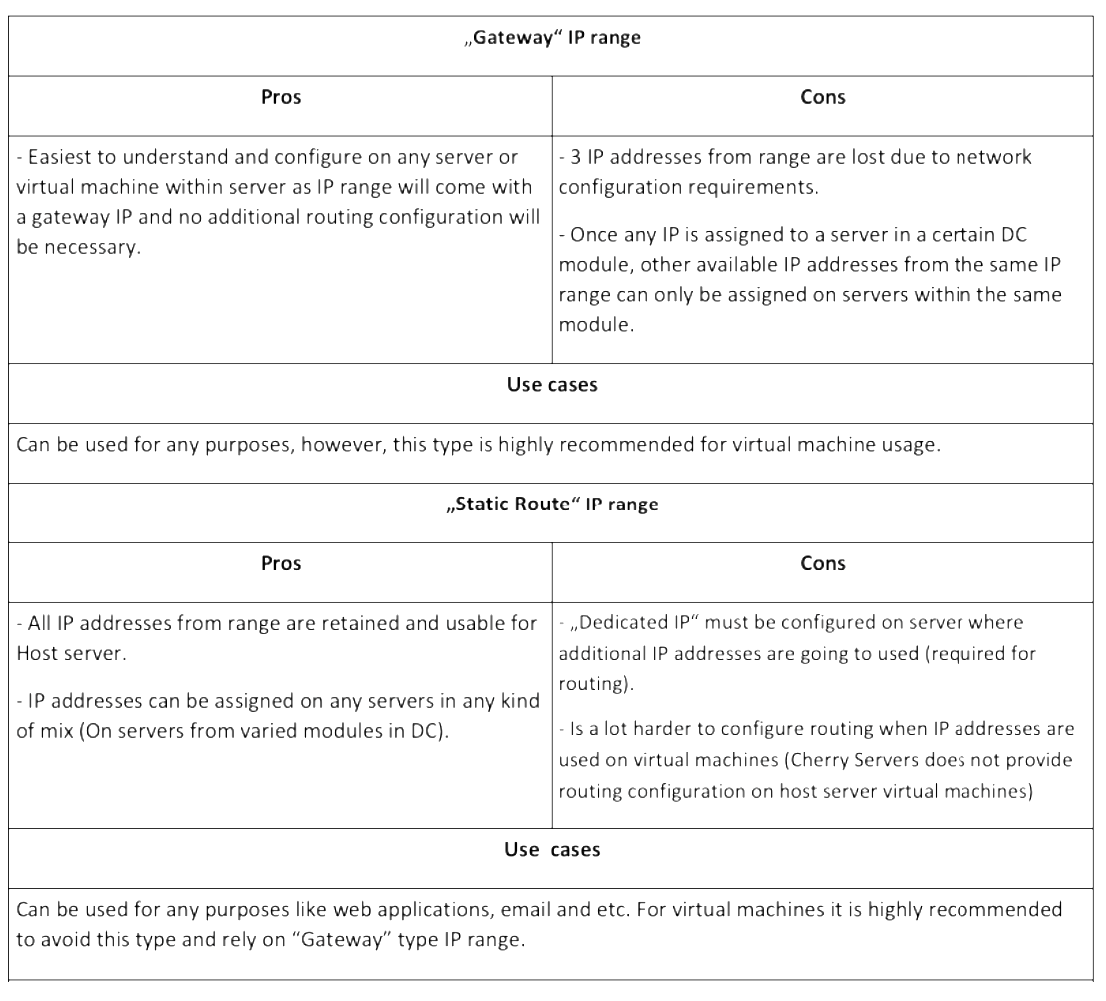
Please refer to the table below that highlights the benefits and uses of each IP range.
# What is the Cherry Servers IP usage policy?
- Each server comes with a static route IP address assigned by default. It can't be changed or moved between servers;
- IP addresses in ranges of 8, 16, 32 or 64 can be ordered per bare metal server (8 IP range only per virtual server);
- Floating IP addresses can be ordered one-by-one, assigned to your selected server(s) and moved between servers within a region.
More IP addresses in ranges of 128 and 256 can be leased for dedicated servers by submitting a request to sales@cherryservers.com.
# How do you delete IPs and Subnets
To delete IPs or subnets, click Networking in your client portal. Then you will see all your IP information and would be able to delete them or assign to the server. Keep in mind, to delete IP you are still using, you should first unassign it from the server. You can do this even if the server has been canceled.
# Does private network (VLAN) work on VPS servers?
Yes. Private network (VLAN) work with both - Virtual and Dedicated servers.
# What is DNS?
The Domain Name System, or DNS, is used to manage the infinite possible domain names on the internet and direct them to various networks/services.
In most cases, this system works similarly to a phonebook, where your computer looks up the desired domain and is given an IP address where this site can be reached.
When you have registered a domain, you can set the Nameservers. By setting Nameservers, you are instructing other DNS servers where to find DNS records for your domain.
Please note we do not offer DNS management services, so the Nameservers you use will depend on your Registrar or DNS management service.
Pointing a Domain to Cherry Servers:
Please be aware this will only point your domain to a server with us. If you have not configured any content/services on the server or have not added the domain to any web hosting control panel that may be installed, this domain will only work as another way to point to your server, like an IP address.
To resolve your domain to your server with us, you must create an A record pointing your domain to this IP.
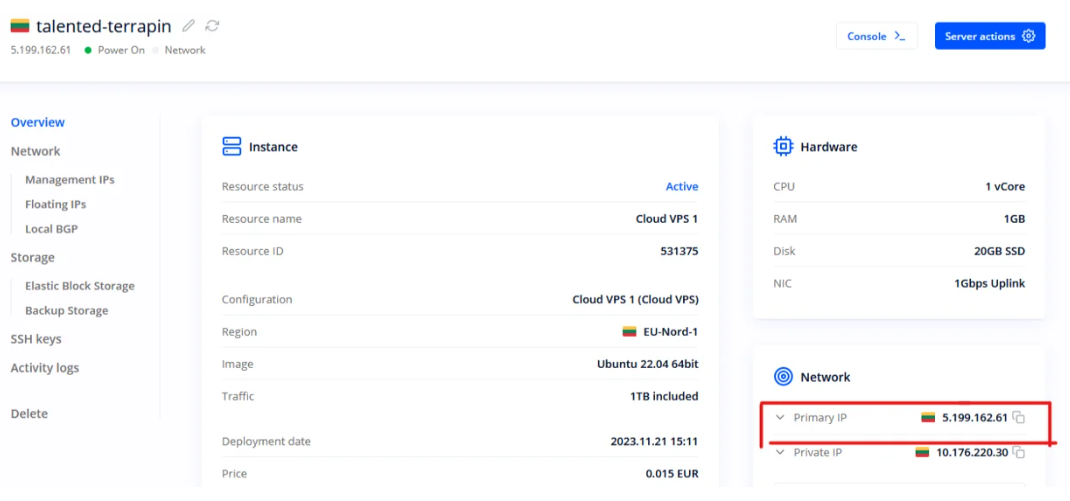
The IP for your server can be found in the client portal by selecting the server as seen here:
The steps to create this A record may vary depending on how the DNS for your domain is managed. Below are some links to popular Registrars and how this can be done in their system:
How to add an A record?
How can I set up an A (address) record for my domain?
How do I create an A record?
If you are unsure how to create this record, please get in touch with your Registrar. They should be able to provide any details regarding DNS management they may offer or, if needed, help direct you to where your DNS records are currently managed.
Depending on your needs, you may also wish to add other records, such as a cName record to point the "www." version of your domain, mx records to direct mail, etc...
Once you have pointed your domain to this IP you may need to allow some time for propagation. This is the time it takes for the various DNS servers worldwide to update their records to include the records you have added/changed. For this to propagate worldwide can take up to 24-72 hours, depending on several factors, as various third-party DNS servers around the world must be updated.
IP Records
In some cases, you may do the opposite of the above DNS records and make it look up your server's IP returns your domain. This is known as rDNS (reverse Domain Name System) and uses PTR records.
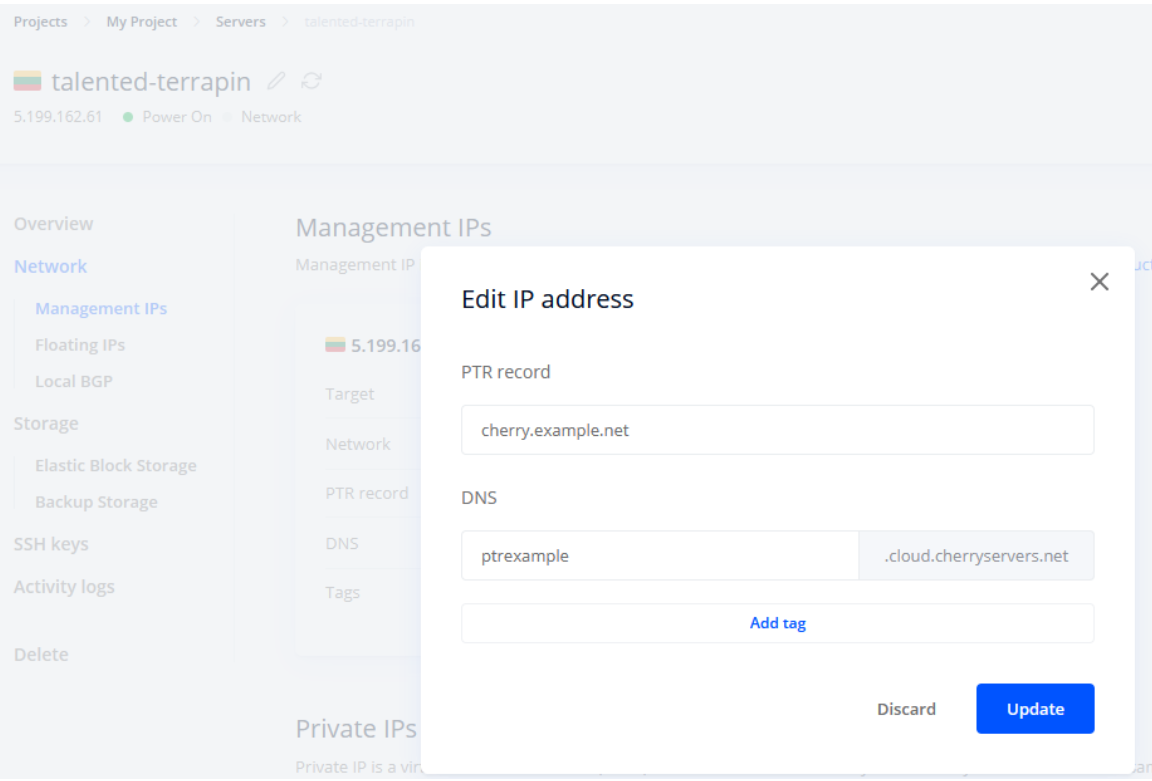
You can set a PTR for your IP by going to the network section of your server, using the three dots to the top right of any IP, and selecting "edit address ."You can then enter your desired domain in the "PTR record" section, as seen here:
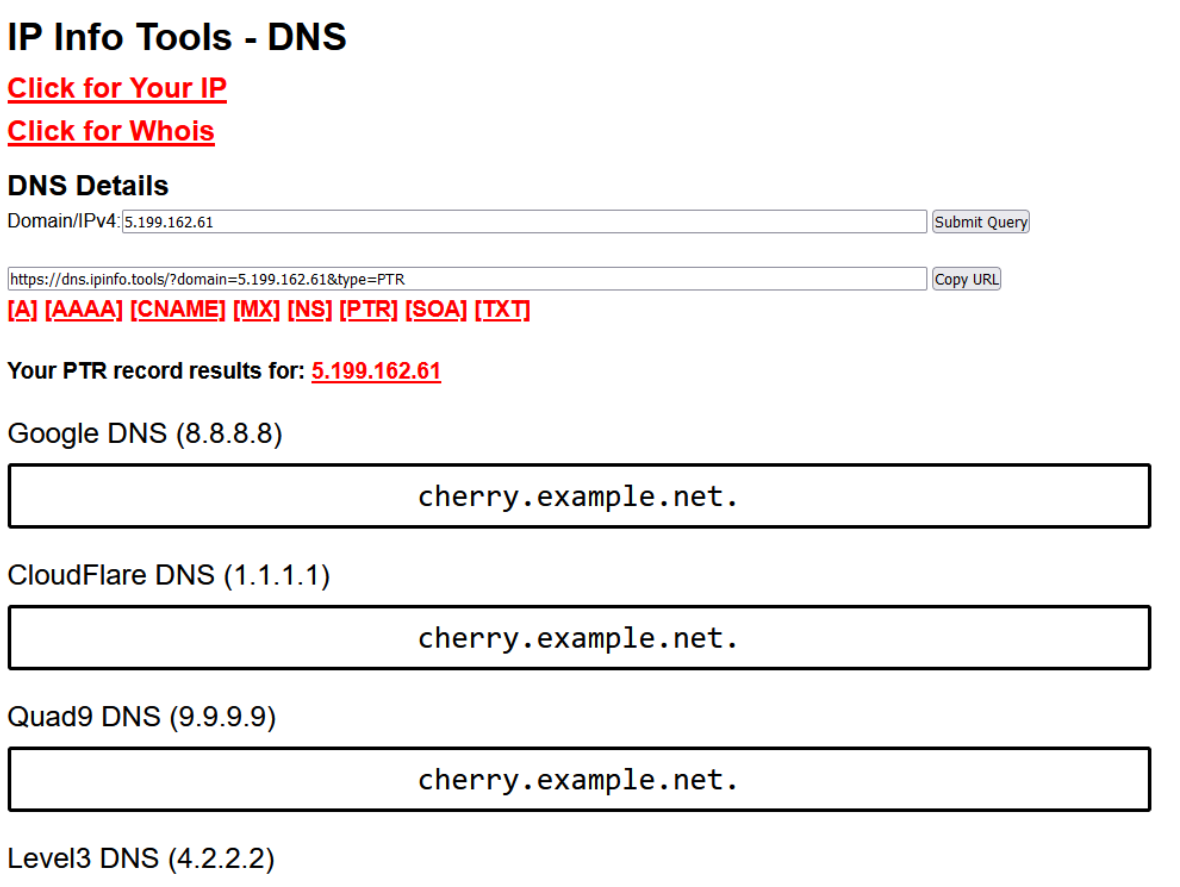
Once this has been done, looking up the records for this IP will return the entered domain:
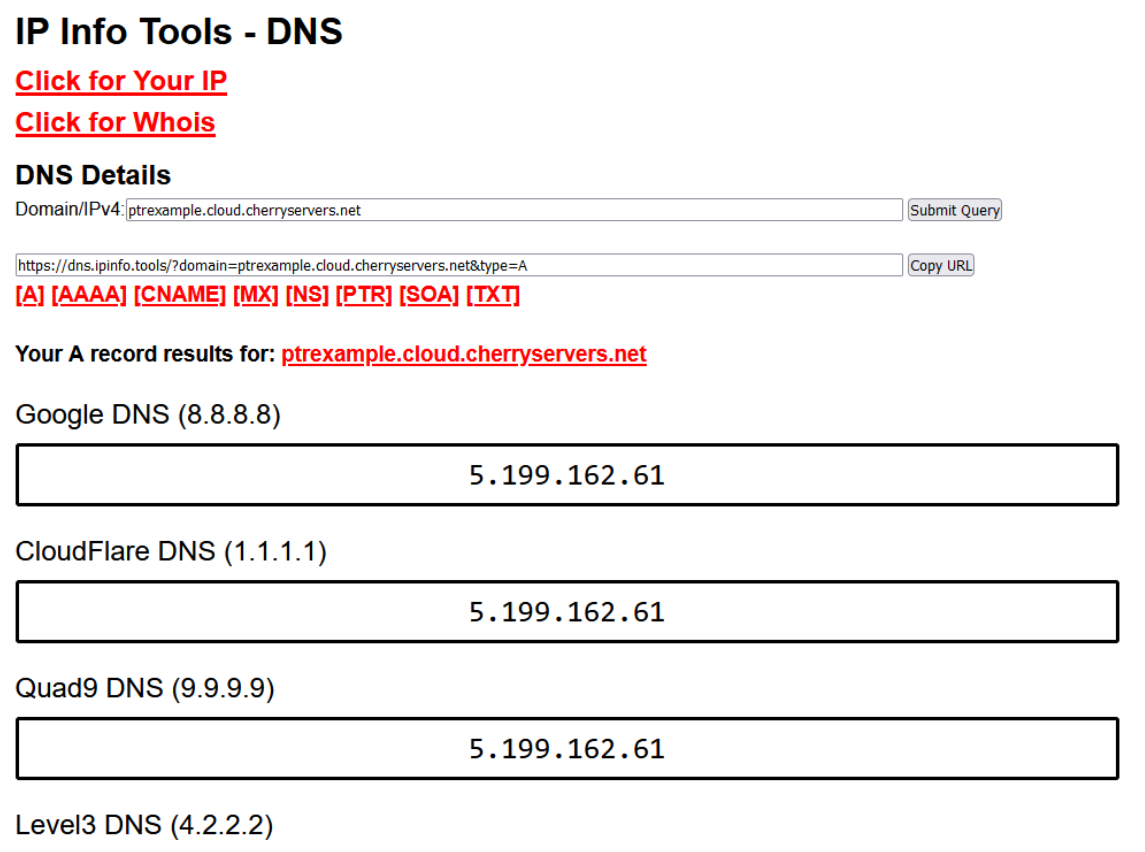
You can also use the DNS section to create a custom ".cloud.cherryservers.net" domain that points to your servers IP, such as in the following example with "ptrexample.cloud.cherryservers.net":
# What is the speed of private VLAN?
Private VLAN has the same speed as your server's public connection. So if you have 1Gbps public connection, your VLAN has 1Gbps. Whereas if your servers has 3Gbps public connection, you get a 10Gbps VLAN.
It is possible to increase this by installing additional network card to 10Gbps or even more. Just contact our Sales to get more information if required.
# Security and Support
# I cannot receive a code via SMS: what should I do?
In this case we recommend double check if your phone number is correct. Also, in rare cases some providers block messages from abroad, if you still have not received the message, let us know - info@cherryservers.com
# How can I get in touch with Cherry Servers engineers?
We are available 24/7 via email or Live Chat. More than this, all our clients get their personal account manager, who can be contacted directly by phone, email or live chat.
You can also get in touch with a preferred department directly via:
support@cherryservers.com
sales@cherryservers.com
billing@cherryservers.com
# I lost access to my email account and cannot log in to my account. What should I do?
In case access to the current client portal e-mail address is lost and you need to change it on our system, please contact us at info@cherryservers.com.
We'll take you through steps, necessary to verify your identity and change the contact e-mail address to your provided.
# Why can I not use live chat to request account changes?
Due to safety reasons we do not offer support via chat in cases when the request is related with server changes such as restart or termination, downgrade or IP change. Same goes to account details.
In order to fraudulent attempts not to disturb your business, all related matter should be handled via info@cherryservers.com.
# Service Abuse Incidents
# How can I unblock my server?
As you would not have have access to server since it's blocked, use the IP KVM or the VNC console to connect locally and address the issue.
# How do I report abuse, and what information should I include?
To report an abuse, please file a complaint to abuse@cherryservers.com. Please include full time stamps, source and destination IP addresses, as well as the log file (or part of it), showing malicious activity taking place.
What Is the Process After Cherry Servers Receives a Report?
After receiving an incident the check it's type: copyright, spam, phishing etc. When we've determined the incident type, we contact the client in question and, if necessary, immediately block the associated IP address/domain/link/port.
There are situations where the involved server was dropped (the client cancelled it) before we received the incident email. In that case we won't be able to offer immediate assistance, but the incidents are logged onto a client's account and tracked.
How Soon Will Cherry Servers Be Able to Act?
We try to react as quickly as possible, but due to possible ongoing priority tasks, the reaction time may be several hours. Each case is individual, therefore it may get bumped to priority if needed.
# I received an abuse notice. What should I do?
Whether you're hosting at Cherry Servers (and we hope you do) or somewhere else, there's a chance that sooner or later you'll receive an abuse notice. We have classified several abuse types:
-
Spamming is the use of messaging systems to send an unsolicited message (spam), especially advertising, as well as sending messages repeatedly on the same site.
-
Copyright & Trademark infringement involves using material, such as a copyright or trademark, without the permission of the owner. These acts can include the unauthorized reproduction, distribution, preparation of derivative works, public performance, or display of that material. The infringement does not need to be for monetary gain to be problematic, just without permission.
-
Malicious activity is any software or manual actions, intentionally designed to cause damage to a computer, server, client, or computer network.
-
Illegal content, generally speaking, would be the following:
-
Child pornography or child abuse;
-
Content that shows extreme sexual violence or materials that are overly violent;
-
Materials that provoke the viewer into committing crimes and carrying out violent acts. This might be material that instructs, promotes or incites violent acts;
-
Content that promotes terrorism or encourages terrorist acts.
In cases of spamming we recommend immediately checking the server for any file modifications, script uploads, unknown running scripts. The reason may also be a hacked user's website, that's now acting as a spam sending agent. In such cases Exim's email queue should show an increase e-mail pollution. Last, but not least, a scan for rootkits may also help identify the culprits. One may also choose to use third-party software that specializes in spam detection. Spamming incidents, more usually than not, result in an immediate SMTP port block. Repeated incidents result in a permanent SMTP block.
-
Upon receiving a copyright & trademark infringement notice you should immediately check if you or your client(s) may be hosting any type of media material, that requires separate licensing rights, which you or your client(s) may not have. We at Cherry Servers most usually provide specific links to the infringing material, so that should help in the identification process. In cases of copyright and trademark infringements we reserve the right to block internet access to associated internet links and for repeated incidents we reserve the right to block the server's HTTP/HTTPS access completely. Each non-repeating incident is given 24 hours to be addressed.
Malicious activity abuse reports are first forwarded to an associated client, whom is then given 24 hours to identify the problem and take action. As with spamming, firstly we recommend scanning the operating system with anti-virus and anti-malware software (if available for a given operating system) and remove any found threat ASAP. Ignoring the incident will result in a particular IP address getting blocked and repeated incidents may results in a permanent IP address block.
Illegal content, in most cases, will result in an immediate URL link and HTTP/HTTPS port block until all related material is permanently removed from our network. Repeated incidents may result in a permanent service suspension.
Please inform us at abuse@cherryservers.com as soon as you've addressed any of the above mentioned incidents and you believe the problem is solved. This can be done by replying to the created abuse ticket.
# Will my services be restricted if I incur ongoing or repeated abuse incidents
In most cases we do not restrict obtaining additional services even if there are active or repeated incident on one's account. Nevertheless, if we notice multiple repeated, for example, malicious activity and/or spamming incidents, we may restrict ordering additional servers in one case or IP ranges in another. In extreme cases, where a client completely ignores our guidelines and purposely fails to comply, we may permanently suspend all services on one's account without the possibility to re-use them.
# What is your DMCA policy?
We at Cherry Servers do not ignore DMCA incidents. After a client is informed about a DMCA incident, 24 hours is given to respond, take action and deal with the infringing material.
If the 24 hour limit is ignored or Cherry Servers is repeatedly contacted regarding the same infringing material, we reserve the right to take action by blocking the associated IP address, HTTP/HTTPS port or limit network access completely.
It should also be noted that we reserve the right to filter out internet links, associated with the infringing material, thus making it unreachable from the internet.
# Affiliate
# Can I promote specific products and services?
Yes you can. Add you Affiliate ID url to any product link and you will still get commissions for all the sales through it. For example if you wish to promote E3-1240v3 server, it's exact link is: https://www.cherryservers.com/pricing/dedicated-servers/e3-1240v3
Just add your Affiliate ID url. For example: https://www.cherryservers.com/pricing/dedicated-servers/e3-1240v3?affiliate=XXXXXX