Ubuntu 26.04 LTS: New Features & Release Date




Ubuntu 26.04 LTS, codenamed Resolute Raccoon, is shaping up to be one of the most notable long-term support releases in recent years. It is scheduled to drop on April 23, 2026, bringing several changes that go beyond the usual incremental updates.
There's a lot to look forward to: a full switch to Wayland, Rust making its way into core utilities, an improved snap ecosystem, and notably, better AMD GPU support, among other improvements.
Ubuntu 26.04 LTS (Resolute Raccoon) is now available for deployment on Cherry Servers virtual machines. For more details on running Ubuntu 26.04 on virtual servers, check out this guide.
#Roadmap to Ubuntu 26.04 LTS
Ubuntu 26.04 LTS receives 5 years of support (up until 2031), with a further 5 years of Expanded Security Maintenance (ESM) updates provided through Ubuntu Pro. This is free for home users (up to 5 machines), while businesses/enterprises require a paid subscription.
Ubuntu follows a structured development cycle with clearly defined milestones. Here is a breakdown of the release path leading to the final LTS release.
| Date | Milestone |
|---|---|
| February 19, 2026 | Feature Freeze |
| March 12, 2026 | User Interface Freeze |
| March 19, 2026 | Kernel Feature Freeze |
| March 23, 2026 | Beta Freeze |
| March 26, 2026 | Ubuntu 26.04 Beta Release |
| April 9, 2026 | Kernel Freeze |
| April 16, 2026 | Release Candidate |
| April 23, 2026 | Ubuntu 26.04 LTS Final Release |
| August 6, 2026 | Point release (Ubuntu 26.04.1 LTS Release) |
This guide walks through some of the most notable features coming in this release.
#Linux Kernel 7.0 – A Major Kernel Release
Ubuntu 26.04 was originally planned to ship with Kernel 6.20, but the version was bumped to 7.0 to align with upstream kernel changes.
Beyond the version number itself, the new kernel delivers significant improvements across hardware and driver support, with better coverage for recent CPUs and GPUs. Power management and scheduler performance have been boosted. Several security components have also been updated to reflect the latest upstream work.
File system support has not been left behind either, with notable improvements landing in F2FS, EXT4, and XFS. The kernel has significantly improved file cache management, resulting in a general performance boost.
#A fresh desktop with GNOME 50 and new default apps
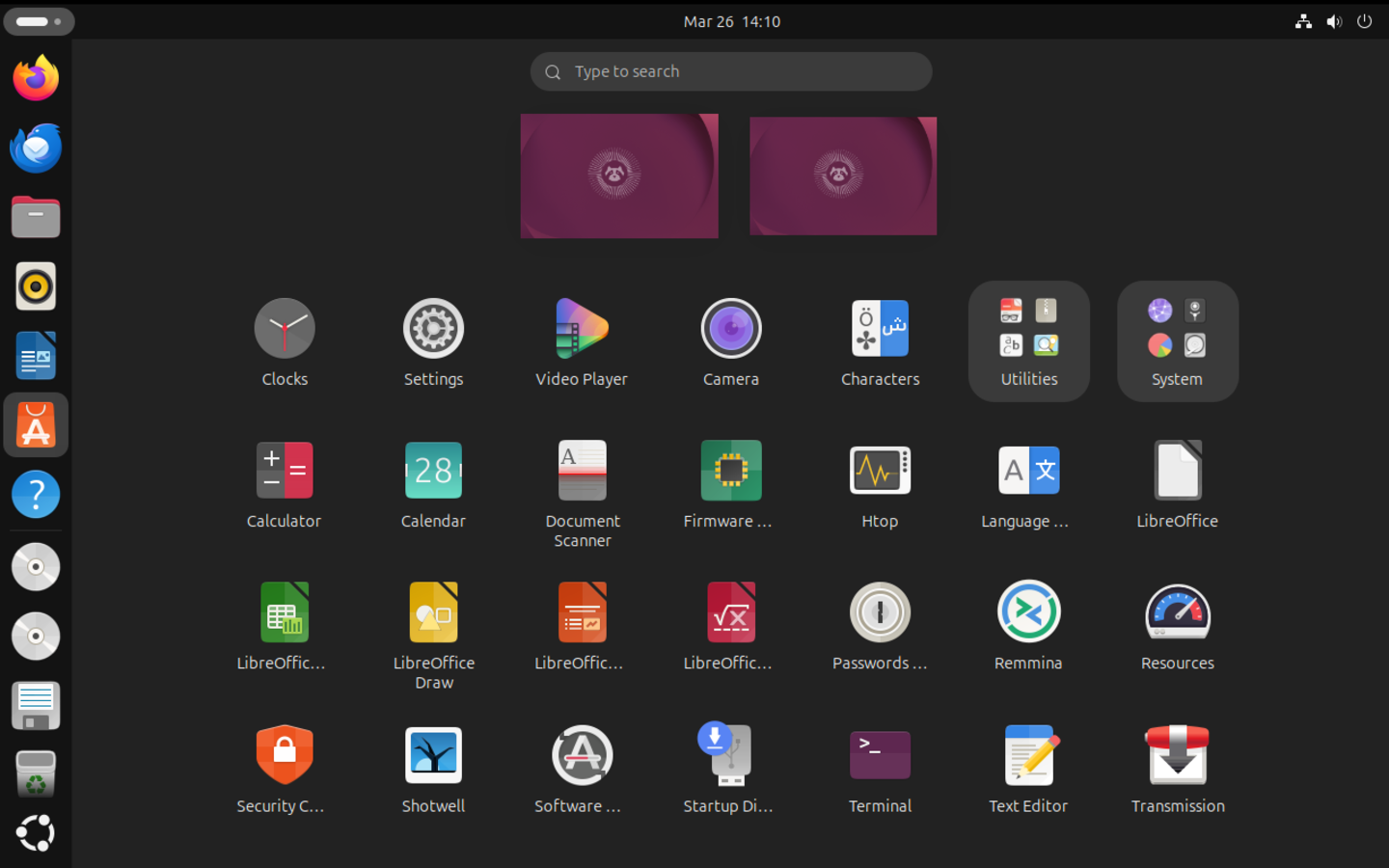
Upon logging in, the most immediately noticeable change is GNOME 50 as the default desktop environment. It brings a range of refinements to how the desktop looks, feels, and performs day-to-day, and Ubuntu will closely track the upstream project to ensure users get the best of what this new major version has to offer.
Two familiar applications are being shown the door and replaced with modern alternatives:
-
Showtime replaces Totem as the default video player. It's more intuitive and fits much better into the modern GNOME aesthetic.
-
Resources replaces the current system resource monitor. It offers a clearer, more organized view of CPU, memory, and network activity.
#Fresh and redesigned folder icons
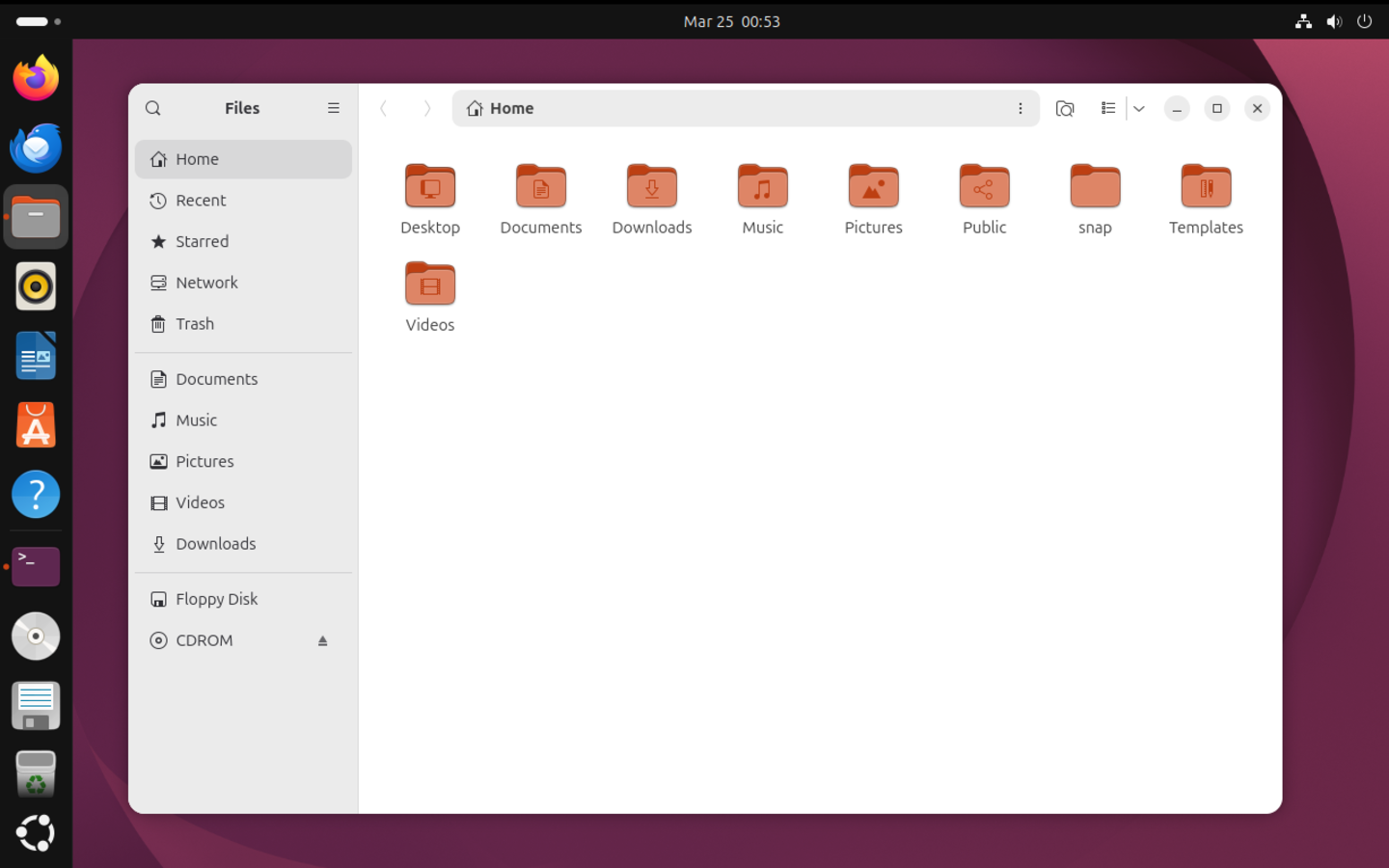
Another noticeable visual refresh is the new-look Yaru folder icons, which now have a squatter shape and rock a more colorful appearance. They have rounder edges, a touch of soft embossing, and an engraved emblem. Additionally, the folder icons rock a more vibrant orange, a shift from previously subdued grey.
The accent color integration also got a notable upgrade. Previously, folder icons subtly changed to reflect your accent color in 26.04; the whole folder shifts to match your chosen color rather than just being tinted by it.
#Wayland Gets Even Better — especially on NVIDIA
X11 has been the dominant display server since Ubuntu's first release in October 2004. With Ubuntu 26.04, Wayland is the default display server, ending X11's reign. This implies X11 support has been deprecated, and GNOME sessions will be handled by Wayland.
Wayland is no longer just the default, it’s the only option for native sessions. Legacy X11 applications are still handled via XWayland (compatibility layer), so compatibility isn’t thrown out entirely, but the era of running a full X11 session is over.
On the hardware compatibility front, Wayland now provides a refined experience on a wider range of NVIDIA hardware. This addresses stability issues to make the Wayland session feel smooth and reliable.
#Fingerprint readers that actually work reliably
Fingerprint login on Linux has always been a bit hit-or-miss. It works great on some laptops and barely at all on others. Ubuntu 26.04 is tackling this head-on by delivering secure, SPDM-based fingerprint authentication, bringing more reliable biometric support to certified OEM devices.
If you have a fingerprint reader on your laptop, there's a much better chance it will work seamlessly and securely.
#Performance Improvements for AMD GPU
For developers and researchers working in AI and machine learning on AMD hardware, 26.04 brings significant news. ROCm (Radeon Open Compute), AMD’s open-source GPU compute platform, will be available directly from Ubuntu’s official repositories for the first time. Previously, setting up ROCm on Ubuntu required navigating external repositories and manually configuring it. With 26.04, installing it is as simple as running sudo apt install rocm. The package updates will be effected through the normal system update process.
Additionally, Ubuntu 26.04 introduces optional x86-64-v3 (amd64v3) package variants, designed to take advantage of the additional instruction sets available on modern Intel and AMD CPUs. (from 2013 onwards). These binaries are compiled with advanced optimizations, ideal for boosting performance in everyday tasks. As these are optional packages, they won't be the default, and legacy machines will not be impacted.
#Refined snap ecosystem
One of the longest-running criticisms of snap packages is their high disk footprint and longer startup times compared with .deb packages. The app's behavior sometimes feels slightly off, with permission prompts popping up at odd times.
With Ubuntu 26.04, Canonical has refined the way snap packages are handled, focusing on performance and usability improvements. These include:
-
Automated updates for Canonical snaps.
-
Faster startup times for snaps.
-
Better sandboxing and improved permission controls.
-
Improved desktop integration.
-
Reduced disk footprint through better compression and deduplication
#Accessibility from the very first screen
The installer and first-boot experience have been reworked based on findings from recent audits. The keyboard navigation is more reliable, screen reader behavior is more consistent, and enabling accessibility features early in the setup process is now easier and no longer an afterthought.
In addition, Orca's Speech Dispatcher is switching to Piper, a neural speech engine that produces noticeably more natural-sounding output with lower latency than before. This development is significant for users who rely on Orca for screen reading. No more robotic speech. Smoother audio and faster response times make the whole experience more wholesome.
#Stronger security, more under your control
Security gets a major boost in this release. TPM-backed full-disk encryption is being brought to general availability, with new features including:
-
Add or remove a PIN or passphrase after installation.
-
Re-encrypt a disk directly from the Security Center.
-
Clearer, localized error messages and refreshed documentation.
App permission prompts are also getting a cleaner, more modern look aligned with GNOME's visual style, with tighter integration into the Security Center. No more cryptic pop-ups that leave you guessing what an app is actually asking for.
#Unified App Center: one place to manage all your software
Right now, managing software on Ubuntu can feel fragmented. You might use App Center for some things, the terminal for others, and Update Manager for system updates. Ubuntu 26.04 is taking initial steps to make the App Center the single destination for managing all applications, regardless of packaging format.
This includes:
-
Full support for deb packages directly within App Center.
-
Phasing out of older tools like
Software Properties. -
Moving Ubuntu Pro features from Software Properties into the Security Center.
The vision is one unified, modern interface that handles everything. It's a multi-release journey, but 26.04 is where it meaningfully begins.
#Better enterprise and cloud login
Ubuntu 26.04 strengthens enterprise integration by enhancing cloud authentication and device management capabilities. This makes it easier to integrate into existing enterprise identity and security infrastructures.
Key highlights include:
-
Shipping authd in the official Ubuntu archive.
-
Publishing a generic OIDC broker to support a wider range of identity providers.
-
Enabling Microsoft password and MFA login flows instead of the device flow.
-
Updated documentation covering new login options and CLI tooling.
If your organization uses Microsoft accounts or another cloud identity provider, logging into Ubuntu in a workplace setting is about to get considerably less painful.
#WSL improvements and Documentation
Ubuntu on WSL is receiving improvements, including expanded automated testing, better multi-instance workflow documentation, and support for Ubuntu Pro on WSL. For developers who prefer running Ubuntu in Windows, this means a more reliable, better-documented experience.
Across the board, Ubuntu 26.04 introduces the most significant documentation push in years, migrating tutorials into new Desktop product documentation and launching a new Ubuntu wiki for community-maintained content. It should be easy to find accurate, up-to-date guidance, just as easy as using Ubuntu itself.
#Download Ubuntu 26.04 daily builds
Ubuntu 26.04 is currently in Beta, and daily builds are available for download. If you are curious, feel free to download a DVD ISO and try it out.
Already running Ubuntu 24.04? Upgrade to Ubuntu 26.04 directly and no fresh install needed.
#Conclusion
The latest features and enhancements are a testament to Ubuntu's commitment to maintaining a robust and pleasant computing environment, expected of any LTS release. Resolute Raccoon is shaping up to be a solid, thoughtful, and exciting release for both new and seasoned Ubuntu users alike.
Now that it's in beta, you can download a DVD copy and test-run it to feel how it handles. A word of precaution: although it is stable enough for general testing, it is not yet recommended for production environments. If you are planning to deploy it on servers, you need to wait for the final LTS release.
Ready to explore Ubuntu 26.04 LTS on a reliable virtual server? Get started today with Cherry Servers and experience peak performance for your projects