How to Use iPerf3 to Test Network Bandwidth
iPerf3 is an open-source benchmarking tool used to measure the speed of data transfers over a network, ensuring everything works efficiently. iPerf3 tests both the upload and download speeds to provide a complete picture of your network’s performance.
This guide will explain how to download, install, and use iPerf3 on Windows and Linux systems. For optimal operations, we recommend that you run iPerf3 tests when fewer people are using the network due to its high bandwidth usage, which may limit the speed of others.
#Instructions to Use iPerf3 on Windows
#Step 1: Download iPerf3
- Visit the iPerf3 download page.
- Download the ".zip" file for Windows.
#Step 2: Extract the “.Zip” File
- Navigate to your "Downloads" folder.
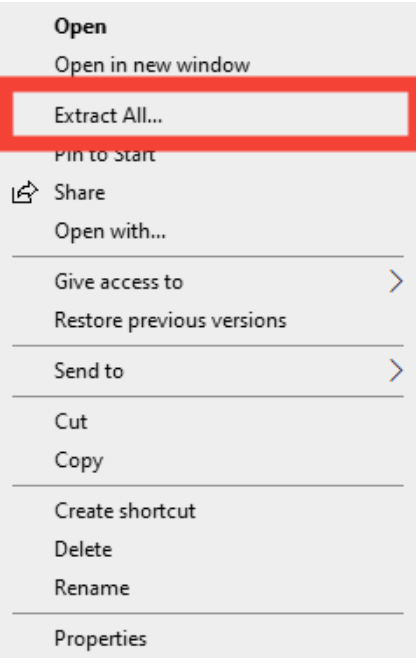
- Right-click the downloaded ".zip" file (e.g., iperf-3.1.3-win64.zip or iperf3.17_64.zip) and select "Extract All..."

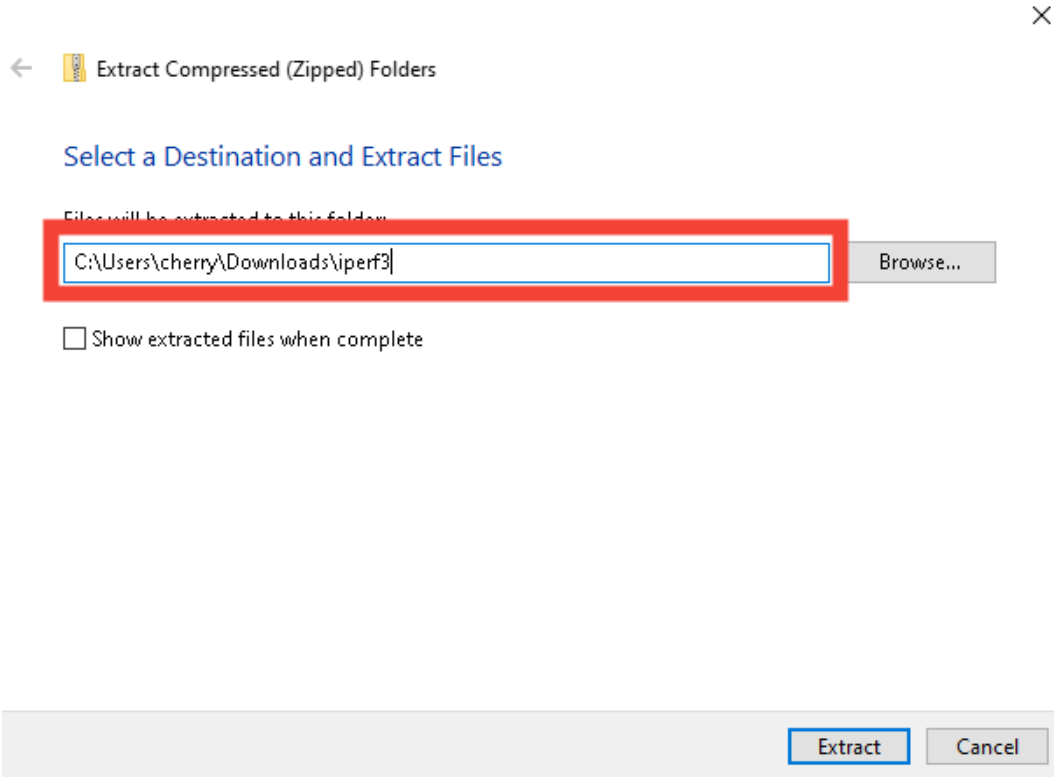
- Choose a destination folder for the extracted files. You can do this wherever you prefer, but for this tutorial, we will use "C:\Users\cherry\Downloads\iperf3".

#Step 3: Navigate to the iPerf3 directory
- Open Command Prompt or PowerShell as an Administrator:
- Command Prompt: Search for "cmd" in the Start menu, right-click Command Prompt, and select "Run as administrator".
- PowerShell: Search for "PowerShell" in the Start menu, right-click Windows PowerShell, and select "Run as administrator".
- Use the "cd" command to navigate to the directory where iPerf3 was extracted. Replace "cherry" with your actual username and "x.x" with the version number:
cd C:\Users\cherry\Downloads\iperf3\iperfx.x_64
#Step 4: Run iPerf3
- To test the bandwidth, run the following command:
Explanation of the flags:
.\iperf3.exe -c paris.testdebit.info -p 9215 -P 10- -c: Specifies the client mode and the server address to connect. In this case, it connects to paris.testdebit.info.
- -p: Specifies the port number to connect to on the server. Here, it uses port 9215.
- -P: Specifies the number of parallel client threads to use. Here, it uses 10 threads.
#Instructions to Use on Linux
#Step 1: Install iPerf3
-
To install iPerf, simply run the command for your Linux distribution from the list below:
- For Debian/Ubuntu-based systems:
sudo apt install iperf3- For CentOS/RHEL-based systems:
sudo yum install iperf3- For Fedora operating systems:
sudo dnf install iperf3- For Arch Linux-based systems:
sudo pacman -S iperf3- For openSUSE operating systems:
sudo zypper install iperf3
#Step 2: Run iPerf3
-
Run the following command:
iperf3 -c paris.testdebit.info -p 9215 -P 10Explanation of the flags:
- -c: Specifies the client mode and the server address to connect. In this case, it connects to paris.testdebit.info.
- -p: Specifies the port number to connect to on the server. Here, it uses port 9215.
- -P: Specifies the number of parallel client threads to use. Here, it uses 10 threads.
#Instructions to Test Network Speed Between Two Servers
To test the speed between two servers using iPerf3, you must set up one server as an iPerf3 server and the other as a client.
#Step 1: Set up the iPerf3 Server
- On the first server, start iPerf3 in server mode:
This command will start iPerf3 in server mode, listening for incoming connections on the default port - 5201.
iperf3 -s
#Step 2: Set up the iPerf3 Client
- On the second server, run iPerf3 in client mode and connect to the first server. Replace “<server_ip>” with the IP address of the first server:
iperf3 -c <server_ip>
#Step 3: Exit iPerf3 Server Mode
- To exit iPerf3 server mode, press Ctrl + C in the terminal where iPerf3 runs.
#Review Test Results
-
iPerf3 displays the test results in the terminal.
Results show the total bandwidth for both client-to-server and server-to-client directions. An example output of this would be:
Output
[ ID] Interval Transfer Bitrate [ 5] 0.00-10.01 sec 194 MBytes 162 Mbits/sec sender [ 5] 0.00-10.05 sec 193 MBytes 161 Mbits/sec receiver [ 7] 0.00-10.01 sec 323 MBytes 270 Mbits/sec sender [ 7] 0.00-10.05 sec 322 MBytes 269 Mbits/sec receiver [ 9] 0.00-10.01 sec 296 MBytes 248 Mbits/sec sender [ 9] 0.00-10.05 sec 293 MBytes 244 Mbits/sec receiver [ 11] 0.00-10.01 sec 580 MBytes 486 Mbits/sec sender [ 11] 0.00-10.05 sec 574 MBytes 479 Mbits/sec receiver [ 13] 0.00-10.01 sec 845 MBytes 708 Mbits/sec sender [ 13] 0.00-10.05 sec 832 MBytes 694 Mbits/sec receiver [ 15] 0.00-10.01 sec 1.26 GBytes 1.08 Gbits/sec sender [ 15] 0.00-10.05 sec 1.26 GBytes 1.07 Gbits/sec receiver [ 17] 0.00-10.01 sec 235 MBytes 197 Mbits/sec sender [ 17] 0.00-10.05 sec 232 MBytes 194 Mbits/sec receiver [ 19] 0.00-10.01 sec 226 MBytes 189 Mbits/sec sender [ 19] 0.00-10.05 sec 223 MBytes 186 Mbits/sec receiver [SUM] 0.00-10.01 sec 3.89 GBytes 3.34 Gbits/sec sender [SUM] 0.00-10.05 sec 3.86 GBytes 3.30 Gbits/sec receiver iperf Done.
#Additional Resources
- List of iPerf3 servers - For a comprehensive list of public iPerf3 servers, visit GitHub iPerf3 Servers.
- iPerf3 documentation - Detailed documentation and various test options are available at the iPerf3 Documentation.
- iPerf3 server locations - Find a list of servers, their locations, and available ports at iPerf3 Server Locations.