Private VLAN Subnet
#What Is a Private VLAN Subnet?
A private VLAN subnet is a virtual local area network (VLAN) interface that groups servers within a team and configures them to communicate as if they were attached to the same wire, despite being located on different LAN segments.
Private VLAN subnets are based on logical connections, rather than physical connections, so servers can be spread across multiple network devices, but appear directly connected, making them more flexible.
Traffic is not filtered or limited in any way between your servers on a VLAN.
By default, all Cherry Servers servers with a pre-installed operating system are deployed with a private VLAN subnet.
#How Does a Private VLAN Subnet Work?
VLANs define broadcast domains on a data link layer (OSI layer 2). A broadcast domain is a set of devices that can exchange network packets with one another. VLAN packets at Cherry Servers are not routed through the network layer (OSI layer 3), thus packet exchange is only possible between domain members on a VLAN scope.
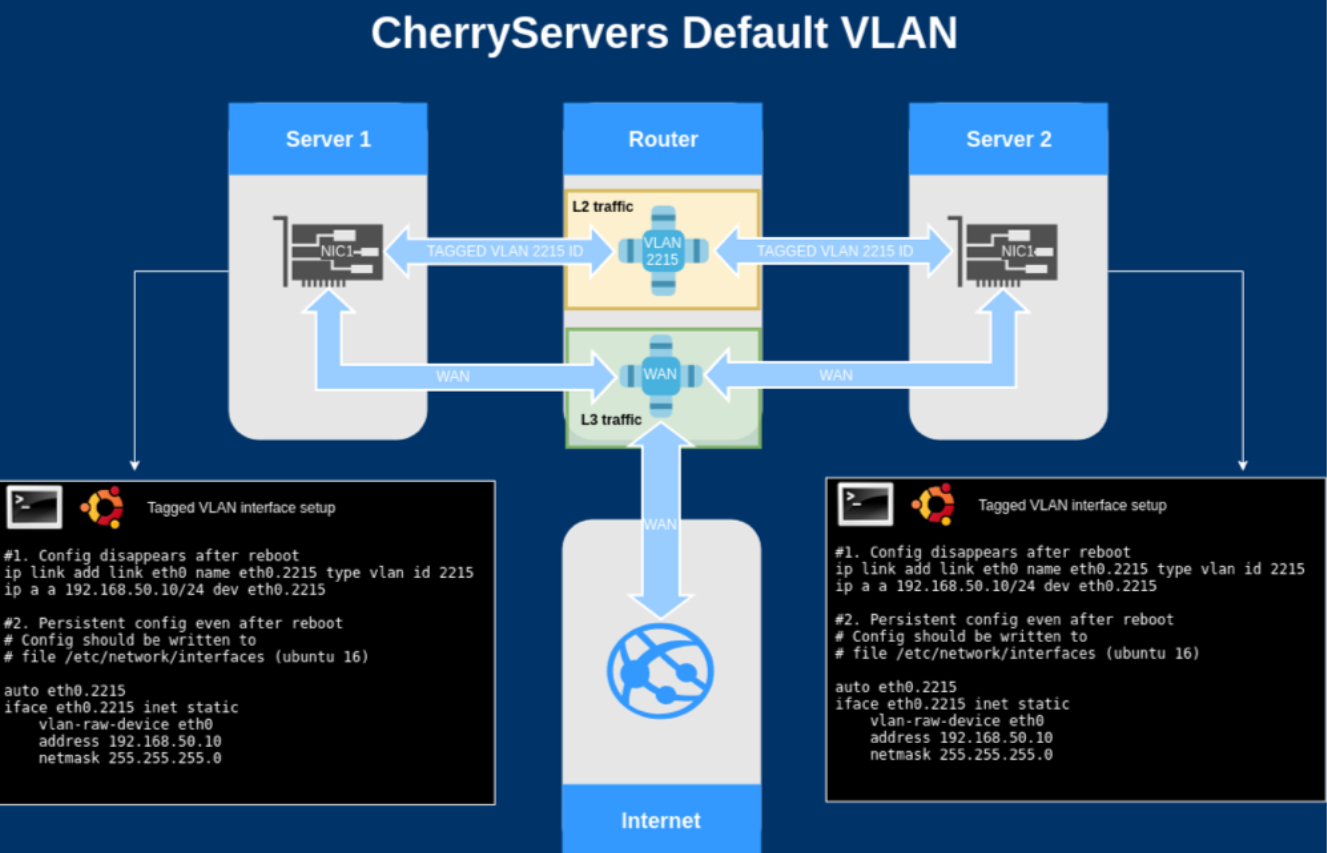
A private VLAN subnet uses the main network card interface of the server, which is also used for routing public traffic. However, Private VLAN traffic is marked by a special VLAN ID, which is assigned upon deploying a new server. This enables the Cherry Servers network to easily differentiate and separate private VLAN traffic from public traffic, despite both coming to the same network interface card.
Example for VLAN with ID 2215:
Main NIC of server - eth0
Virtual VLAN NIC - eth0.2215
For management, by default all servers with a pre-installed operating system come with a Private VLAN interface assigned. Furthermore, they are automatically assigned with a private IP address which can be used to interconnect your servers within the same region without any additional configuration.
When using a Linux OS, You can check your VLAN interface and private IP address by using an “ip a” command. In the event that you need to use different private IP addresses, we recommend using the following ranges:
- 10.0.0.0/8
- 172.16.0.0/12
- 192.168.0.0/16
An example of a default Private VLAN setup is shown below:
Private VLAN has the same speed as your server's public connection. If needed, it is possible to increase this by installing an additional network card. Please contact our dedicated support engineer team for more information.